Hub documentation
Advanced Security
Single Sign-On (SSO) Audit Logs Storage Regions Data Studio for Private datasets Resource Groups (Access Control) Advanced Compute Options Advanced Security Tokens Management Publisher Analytics Gating Group Collections Network Security Rate Limits Blog Articles
PRO Plan Repositories Getting Started with Repositories Repository Settings Storage Limits Storage Backend (Xet) Local Cache Pull Requests & Discussions Notifications Collections Webhooks GitHub Actions Notebooks Next Steps Licenses
Models The Model Hub Model Cards Eval Results Leaderboard Data Gated Models Uploading Models Downloading Models Integrated Libraries Model Widgets Model Inference Models Download Stats Model Release Checklist Local Apps Frequently Asked Questions Advanced Topics
Datasets Datasets Overview Dataset Cards Gated Datasets Uploading Datasets Uploading Datasets (for LLMs) Downloading Datasets Streaming Datasets Integrated Libraries Data Studio Datasets Download Stats
Spaces Spaces Overview Spaces GPU Upgrades Spaces ZeroGPU Spaces Dev Mode Spaces Disk Usage & Storage Spaces Custom Domain Spaces as MCP servers Spaces as Agent Tools Spaces as API Endpoints Gradio Spaces Streamlit Spaces Static HTML Spaces Docker Spaces Embed your Space Run Spaces with Docker Spaces Configuration Reference Sign-In with HF button Featured Spaces Spaces Changelog Advanced Topics
Storage Buckets new Jobs Jobs Overview Quickstart Pricing and Billing Manage Jobs Configuration Popular Images Examples & Tutorials Schedule Jobs Webhook Automation Reference
Agents Agents Overview Hugging Face CLI for AI Agents Hugging Face MCP Server Hugging Face Agent Skills Building agents with the HF SDK Local Agents with llama.cpp Agent Libraries
Other Advanced Security
This feature is part of the Team & Enterprise plans.
Team & Enterprise organizations can improve their security with advanced security controls for both members and repositories.

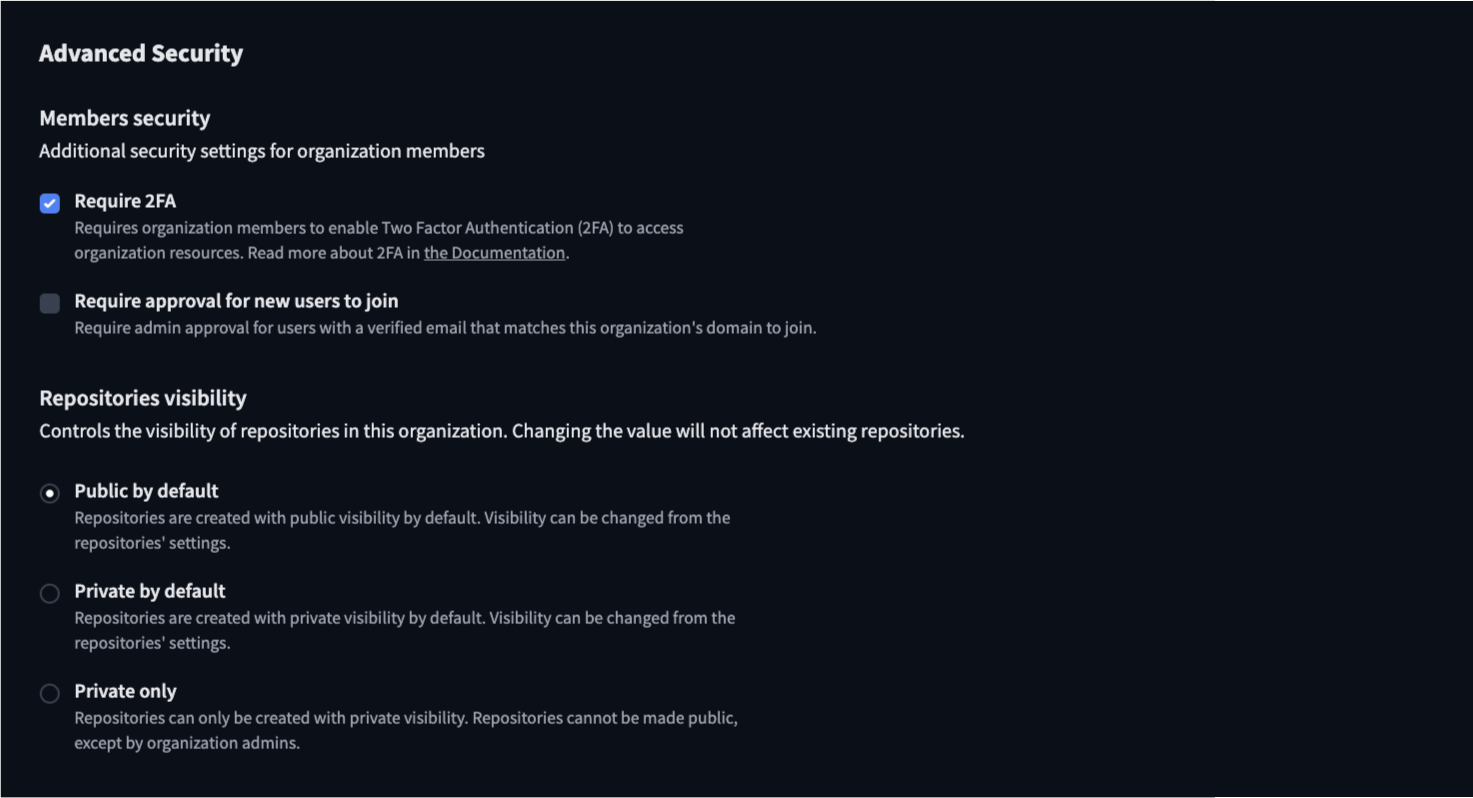
Members Security
Configure additional security settings to protect your organization:
- Two-Factor Authentication (2FA): Require all organization members to enable 2FA for enhanced account security.
- User Approval: For organizations with a verified domain name, require admin approval for new users with matching email addresses. This adds a verified badge to your organization page.
- Hide members list: When enabled, the list of members will not be visible on the organization page. Note that users can potentially find organization membership information through other means, so do not use for critical use cases.
Repository Visibility Controls
Manage the default visibility of repositories in your organization:
- Public by default: New repositories are created with public visibility
- Private by default: New repositories are created with private visibility. Note that changing this setting will not affect existing repositories.
- Private only: Enforce private visibility for all new repositories, with only organization admins able to change visibility settings
These settings help organizations maintain control of their ownership while enabling collaboration when needed.
Update on GitHub